
Motorola Moto 360 Review

Introduction
Motorola has been fighting an uphill battle for some time now, that’s just the reality of things. In today’s bustling smartphone industry, one that’s being shaped by the bigger, more renowned players like Apple and Samsung, we have forgotten how Motorola played its part to shape Android’s success in the space. Heck, it was only a few years ago when the Motorola DROID launched to much acclaim – putting the spotlight once again towards the company.
Fast forward to the present, smartwatches have popped into our culture – giving us yet another budding segment that’s expected to see substantial growth over the next couple of years. Taking the bull by the horn, the Motorola Moto 360 was the talk of the town when it was unveiled back in Google I/O, easily garnering adulation from attendees – despite the fact it was going to launch well after its esteemed rivals in the Samsung Gear Live and LG G Watch. Well, the time has come for the Moto 360. With all the hype surrounding it, we’re itching to find out whether the wait is worth it!
- Wall charger
- Charging dock
- Quick start guides
Design
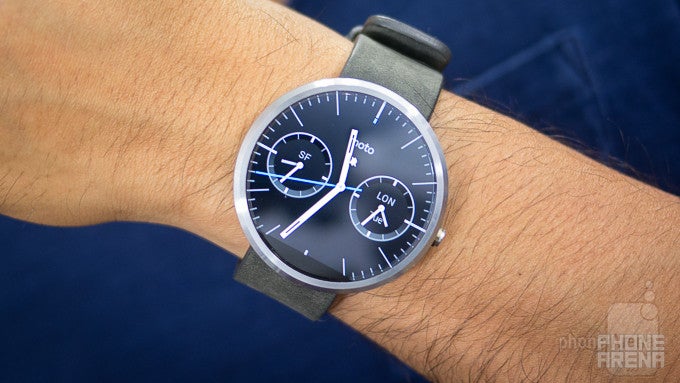
The Moto 360 makes it hip to be circular, making it THE smartwatch we don’t mind resting on our wrist.
Until now, all of the popular smartwatches have been square in shape. Samsung’s line of smartwatches has been squarish for the most part, although, new models like the Gear Live are cut accordingly to contour the wrist more comfortably. Meanwhile, the LG G Watch is simply an ugly duckling with its cheap plastic casing and far-from-ergonomic design. Fortunately, for all of us, Motorola is finally the one to deliver a smartwatch design we don’t mind wearing and showing off!
Staring at the thing, our eyes are just instantly affixed to its beautiful design. Elegant, luxurious, iconic, and hip are words that intimately describe the Moto 360’s immaculate industrial design. Sheesh, there’s no arguing that Motorola employs some awesome engineers, those who take pride and joy in their work! Impressively, everything came together perfectly with this gorgeous looking timepiece.
For those of you wondering, there’s a single button towards the right edge of the Moto 360. Pressing on it once will turn on the display, while long-pressing gets us into the settings menu – where we can adjust its brightness, change the watch face, turn it off, and much more. Around the backside, there’s a heart rate sensor that glows in a subtle green color to measure our pulse (more on that later). Best of all, there’s no charging port with the Moto 360, as it opts to utilize a discrete wireless charging system instead.
Display
Armed with an eye-caching round display, it’s absolutely unique and classy. Still, we wish its resolution was just a smidgen higher.
A first of its kind, the Moto 360 is the first watch powered by Android Wear to feature a round display. Specifically, it’s a 1.56-inch 320 x 290 (205 ppi) LCD display with Gorilla Glass 3 that we’re presented with – and boy does it impress and astound! Technically, it’s not larger or higher resolution than the displays in the Samsung Gear Live or LG G Watch, but nevertheless, we’re most intrigued by its round nature.
Using good old LCD technology, we’re better able to view the screen outdoors, where the sun’s presence can become a distraction. Unlike the AMOLED screen of the Samsung Gear Live, the Moto 360’s round LCD display is still visible under the harsh conditions – further aided by its decent viewing angles. Colors, too, are represented nicely, as it produces tones that are vibrant and lively. Interestingly, there’s an ambient light sensor in the Moto 360, enabling the display to adjust its brightness automatically to adapt to the conditions. That’s something that the aforementioned smartwatches lack.
Interface and Functionality
For the most part, the Android Wear experience doesn’t differ here from what we’ve seen already, but Motorola throws in two heart rate tracking apps to help motivate us to be active.
Google’s new Android Wear is still in its infancy, but it’s slowly seeing more support from third-party apps. Therefore, the core experience of the Moto 360 doesn’t differ all that much to what we’ve seen already with other Android Wear smartwatches. At the heart of it all, Android Wear has a uniform approach that makes the experience identical between all Android Wear smartwatches. Now, we won’t get into all of the details, seeing that we covered the noteworthy things in previous reviews, but we’ll quickly mention what’s different here on the Moto 360.
Processor and Memory
Compared to its rivals, the performance here is just a notch behind, but it’s nothing terrible.
Crammed into the casing, the Moto 360 is powered by a TI OMAP 3 processor coupled with 512MB of RAM. Playing around with some pre-production units at Motorola’s headquarters in Chicago, we were pretty pleased by the snappy and fluid response of the Moto 360. However, after messing around with our review unit, a final retail one, we do notice that its performance isn’t as buttery smooth. In comparison, the Samsung Gear Live’s performance seems snappier. Well, it’s not sluggish or anything like that, as the Moto 360 handles all operations without any noticeable hitches to its performance, but it’s just a notch behind the performance of its existing competition.
Connectivity
Relying on Bluetooth 4.0 LE connectivity to interact with an Android powered smartphone (a Moto X in our case), the Moto 360 is able to establish the connection for approximately 25 feet indoors – matching the distance of the Gear Live. In order to initially pair it, we’re required to download the Android Wear app from the Google Play Store, which does nothing more than initializing the connection and being a hub to browse for certain compatible Android Wear apps.
Multimedia
Okay, so the only multimedia function that we have access to on the watch is controlling music – and that’s all folks! After selecting a song to play, whether through Android Wear’s “okay Google” function, or merely selecting it through our connected smartphone, the smartwatch is transformed into nothing more than a controller. Not only do we have access to the pause/play function directly from the card, but swiping over gives us forward and reverse functions as well. And that, folks, pretty much sums up the extent of its multimedia offering at the moment.
Calls
Battery
You’ll want to set the ambient screen feature to off in order to preserve battery. Typically, it’s able to get us through a solid one-day of usage.
In our experience, the Moto 360’s 320 mAh battery delivers the same results we’ve seen with the other two Android Wear smartwatches we reviewed – so it’s nothing too outstanding. Depending on how you set it up, you’ll be able to achieve easily an entire day without the need to recharge at any point.
Setting the ambient screen feature to off, so the display turns off entirely when it’s not being used, we’re able to power through an entire day without concern. However, turning it on zaps the battery to the point that it requires recharging after hitting the 12 hour mark. In all honesty, we prefer going with the former method not only to preserve its battery life, but because the Moto 360 looks oh-so good with its display turned off too.
Oh yeah, the Moto 360 features wireless charging as well. The included docking station doubles as a nifty bed side alarm clock that gives us visibility to the time and the 360’s charging status. Needless to say, we prefer this method over the proprietary cable methods of the Samsung Gear Live and LG G Watch.
Conclusion
Finally, we have a smartwatch we can enjoy wearing on our wrist! Everything about the Moto 360’s design screams cutting-edge, putting to shame the designs of its rivals. On top of being a premium looking contemporary timepiece, there’s this futuristic appeal that radiates exquisitely from its round display. Until now, everyone has been going with a traditional squarish display – so it’s refreshing to find a circular one here!
Visually, the Moto 360 is a remarkable testament to quality industrial design. From its unique design, to its high-quality materials, there’s no denying that this puts to shame everything else that came before. And they didn’t skimp out on features, as the Moto 360 is crammed with a heart rate sensor, wireless charging, ambient light sensor, dual microphones, and one luxurious looking round display.
Even though it certainly gets our attention for its impressive design, its functionality still adheres to the principles of Google Wear. Knowing that, there’s nothing terrible new that we haven’t seen before, or on other Android Wear smartwatches – so the Moto 360’s usefulness will hinge solely on how the platform matures.
Priced at $249.99 for the base model, one that comes with a leather band, it’s more expensive than the $200 Samsung Gear Live and $230 LG G Watch. Considering that the three share the same core experience, the deciding factor here is the Moto 360’s supreme design. Sure, it’s an extra $50 over the formidable Samsung Gear Live, but it’s one we’re happy to dish out to have our wrist graced with such an elegant timepiece. Without a doubt, it’s a marvelous masterpiece that makes it hip to be circular.
Software version of the review unit:
Software Version: 4.4W.1
Build Number: KGW42N


Popular stories


Latest News


Things that are NOT allowed:
To help keep our community safe and free from spam, we apply temporary limits to newly created accounts: