Google is removing the Search button from its iconic homepage! The company continues with its AI push, despite losing more than $500 billion in market value due to AI search cannibalizing ad revenue.
Google rolls out a new Google Search interface
Robby Stein, VP of Product for Google Search, shared the news on X. | Image by X
Robby Stein, VP of Product for Google Search, shared the news on X, saying, "People are coming to Search with more questions that aren’t just one and done." The new interface includes dedicated buttons for AI-powered features and a sidebar for recent AI Mode searches.
These AI buttons bring Nano Banana image generation under the search bar, a button for uploading files (Ask about files), a Brainstorm button that allows you to generate ideas with Gemini, and the good old "I'm Feeling Lucky" button, which just opens the first result after your type in a search query.
There's an iconic button that's missing from the new interface.
Poll
7 Votes
Will you miss the traditional Search button?
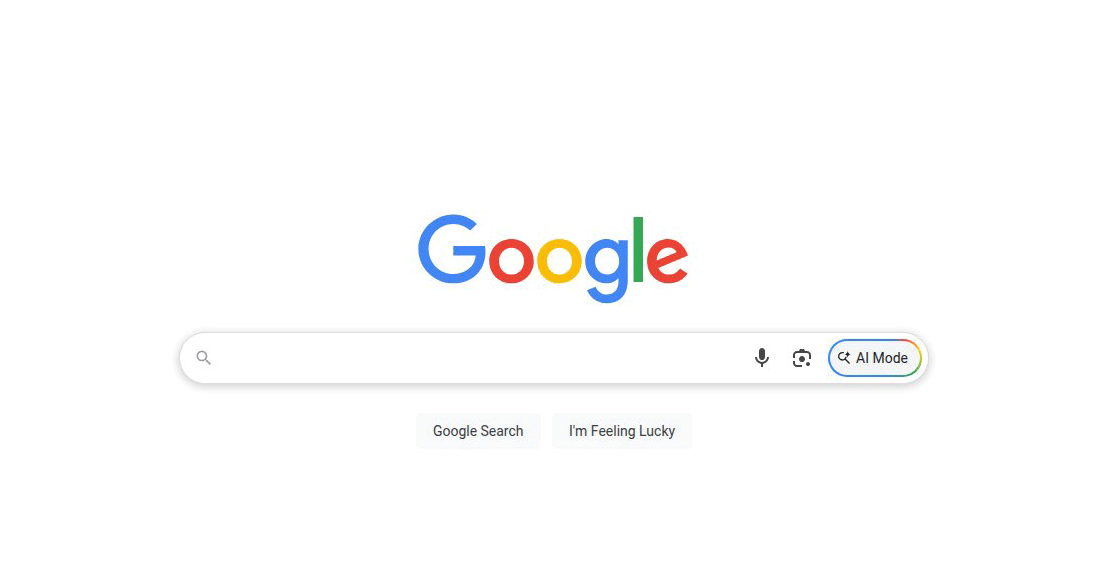
The Google Search button is nowhere to be found
New on the Google desktop homepage globally: we’re rolling out a collapsible sidebar to easily find & jump back into your recent AI searches.
People are coming to Search with more questions that aren’t just one and done – and in testing, this sidebar made a big difference for making progress & continuing to explore the web.
The traditional Google Search button, mirrored by a Magnifying Glass button at the beginning of the search field, is gone. They're both gone.
There were reports that Google was considering the change, and apparently, the company carried out tests to see how this new interface affects the user experience.
Now the change is official and rolling out globally. As a person who grew up with traditional Google Search, I can't help but feel a bit sad. But as Bob Dylan once said "The times they are a-changin'."
Recommended For You
Traditional search functionality remains intact
The search button may be gone, but you can initialize a simple search by typing your query and hitting Enter. | Image by Google
Before you reach for your pitchfork and torch to start a mutiny, there is some good news. Even though the Google Search homepage is now filled with AI buttons and features, traditional search is still there—albeit a bit hidden.
If you type a search query in the search field and simply hit "Enter" or "Return," regular search results will pop up. That's a bit reassuring, but who knows what change could be coming next.
The new interface is rolling globally as you read this. Are you going to miss the old "Search" button? Share your thoughts and experiences with AI Mode in the comment section below.
Read more about Google, Gemini and new search features here:
Mariyan, a tech enthusiast with a background in Nuclear Physics and Journalism, brings a unique perspective to PhoneArena. His childhood curiosity for gadgets evolved into a professional passion for technology, leading him to the role of Editor-in-Chief at PCWorld Bulgaria before joining PhoneArena. Mariyan's interests range from mainstream Android and iPhone debates to fringe technologies like graphene batteries and nanotechnology. Off-duty, he enjoys playing his electric guitar, practicing Japanese, and revisiting his love for video games and Haruki Murakami's works.
A discussion is a place, where people can voice their opinion, no matter if it
is positive, neutral or negative. However, when posting, one must stay true to the topic, and not just share some
random thoughts, which are not directly related to the matter.
Things that are NOT allowed:
Off-topic talk - you must stick to the subject of discussion
Offensive, hate speech - if you want to say something, say it politely
Spam/Advertisements - these posts are deleted
Multiple accounts - one person can have only one account
Impersonations and offensive nicknames - these accounts get banned
To help keep our community safe and free from spam, we apply temporary limits to newly created accounts:
New accounts created within the last 24 hours may experience restrictions on how frequently they can
post or comment.
These limits are in place as a precaution and will automatically lift.
Moderation is done by humans. We try to be as objective as possible and moderate with zero bias. If you think a
post should be moderated - please, report it.
Have a question about the rules or why you have been moderated/limited/banned? Please,
contact us.
















Things that are NOT allowed:
To help keep our community safe and free from spam, we apply temporary limits to newly created accounts: